Clinic Compliance Calendar · Free
A clinic compliance calendar that tells you what is late before a surveyor does.
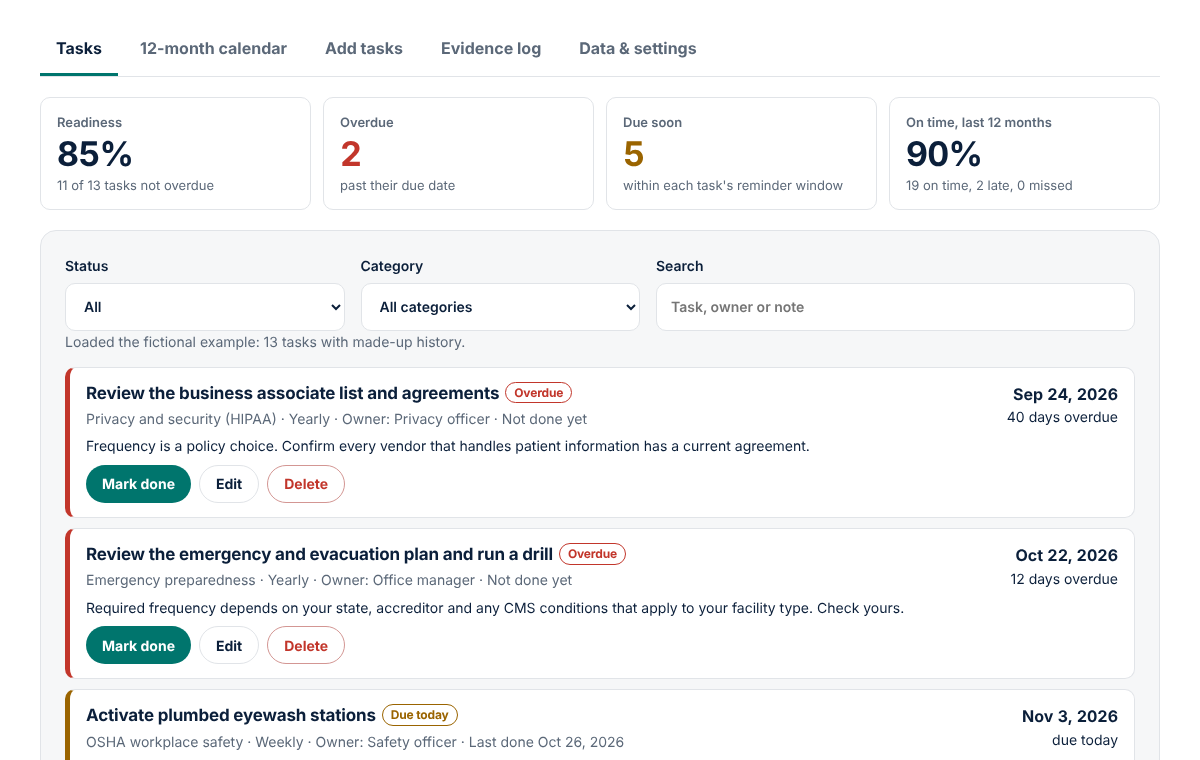
Pick the recurring obligations that apply to your practice from a cited starter library, set due dates, and mark each one done with where the proof is filed. Overdue tasks rise to the top.
For practice managers and compliance leads. No account, nothing uploaded.
Why clinic compliance slips
No single task is hard. The trouble is that a small practice carries a dozen of them, each on its own cycle: monthly extinguisher checks, yearly bloodborne pathogens training, a CLIA certificate that lasts two years. The schedule usually lives in one person's head until that person is on leave or an inspector asks for last year's records.
Much compliance software is sold as a program with consulting, often quoted per practice or per user. Free help is a static medical office compliance checklist that cannot tell you what is overdue today. This is a free, working tracker with a source behind every default.
How the compliance calendar works
1. Pick your tasks
Tick items in the cited starter library or add your own.
2. Set the dates
Each task gets a due date, a repeat cycle and a reminder window.
3. Mark it done
Record who did it and where the evidence is filed. Missed cycles are counted honestly.
4. Show your work
Export the evidence log, print the list, or add due dates to Google Calendar or Outlook.
What is in the starter library
Common cycles for US outpatient clinics. Not all apply to every practice, and states and accreditors add their own.
- Bloodborne pathogens: Exposure Control Plan review and staff training at least annually (29 CFR 1910.1030).
- Fire extinguishers: monthly visual inspection, annual maintenance, yearly employee education (29 CFR 1910.157).
- Eyewash: required where corrosives are used (29 CFR 1910.151(c)); weekly activation per the voluntary ANSI/ISEA Z358.1 standard.
- OSHA 300A posting, February 1 to April 30 (29 CFR 1904.32), only if you keep injury records; most medical offices are partially exempt.
- CLIA: certificates are valid for 2 years (CMS), plus a monthly kit and control check.
- Vaccine storage: min/max temperatures checked every workday and device calibration every 2 to 3 years (Immunize.org); VFC coordinator training, plan updates and recertification (VFC Operations Guide).
- HIPAA: risk analysis review (HHS guidance) and training (45 CFR 164.530(b)); yearly cycles are labeled as policy choices.
- Policy items: hazard communication review, emergency drill, business associates, license expirations, AED and equipment.
Who it is for
Practice and office managers, compliance and safety officers in small practices, urgent care and surgery centers, and the lead medical assistants who run the weekly checks.
How to build a healthcare compliance calendar in 15 minutes
- Open Add tasks, tick every library item that applies and add them.
- Use Edit to set real due dates, such as your CLIA certificate's expiration date.
- Add your own: state license renewals, accreditation and payer deadlines.
- Set an owner by role and a reminder window for each task.
- Export the .ics file into the office calendar and keep a JSON backup.
- Choose Mark done each time, noting where the evidence is filed.
Pricing
The free tool is complete and live now.
Free
- Cited starter library and unlimited custom tasks
- Overdue, due-soon and readiness tracking
- Evidence log, 12-month calendar view and print
- CSV, JSON backup and .ics calendar export
Pro
or $79 per year
- Account with tasks synced across your devices
- Email reminders before each due date
- One-page PDF compliance report for your binder
- Attach a photo or file as evidence to each completion
Team
for up to 5 locations
- Everything in Pro for your whole staff
- Assign tasks to people, with their own reminders
- One shared dashboard across locations
- Read-only view for owners and physicians
Pro and Team are in early access. Reserving a spot is free and nobody is charged until their plan is activated; we will email you from [email protected] with the final price before anything is billed.
FAQ
What goes on a medical office compliance checklist?
It depends on your services, state and accreditor, but most outpatient clinics track bloodborne pathogens training and plan review, fire extinguisher checks, eyewash activation, CLIA certificate renewal, vaccine storage monitoring, and HIPAA risk analysis and training. The starter library covers these with a source link for each.
Does OSHA require annual bloodborne pathogens training?
Yes, for employees with occupational exposure: at initial assignment and at least annually after that (29 CFR 1910.1030(g)(2)(ii)), with records kept 3 years. The Exposure Control Plan is also reviewed at least annually.
Do medical offices have to post the OSHA 300A form?
Many do not. OSHA lists offices of physicians, dentists and other health practitioners, outpatient care centers and medical and diagnostic laboratories (NAICS 6211 to 6215) as partially exempt from injury and illness recordkeeping unless OSHA or the Bureau of Labor Statistics asks in writing. Those that must keep records post the 300A summary from February 1 to April 30 (29 CFR 1904.32).
Is HIPAA training required every year?
Not by the Privacy Rule itself. 45 CFR 164.530(b) requires training new workforce members within a reasonable time and retraining when policies change materially. Many practices still choose a yearly refresher, so the library labels it as a policy choice.
How does the calendar decide the next due date?
Each task repeats on a fixed schedule or from the last completion. On a fixed schedule, a check due on the 1st stays due on the 1st, and cycles that passed undone are counted as missed. From the last completion, the next date is counted from the day you did it.
Can I put it in Google Calendar or Outlook?
Yes. Export the .ics file and import it into Google Calendar, Outlook or Apple Calendar. Each task becomes an all-day event on its due date. Some apps, including Google Calendar, may not keep reminders from an imported file. Export again after you mark tasks done.
Where is my data stored?
Only in your browser's local storage on this device. Nothing is sent to MedRise. Export a JSON backup to move devices, and use Clear my data to delete everything. The tool tracks tasks, never patients.
Sources: 29 CFR 1910.1030; 29 CFR 1910.157; 29 CFR 1904.32; OSHA Part 1904 Subpart B Appendix A; 45 CFR 164.530(b). Check the current text before relying on any cycle.
Put this year's compliance on one page
Free, private and ready in your browser.
Education and workflow support only. The Clinic Compliance Calendar helps you schedule and document recurring tasks. It is not legal advice, does not decide which rules apply to your practice, and does not replace your compliance officer, accreditor, state requirements or the current text of each regulation. Never enter patient information. See the terms and disclaimer and privacy notice.