Clinic SOP Builder · Free
A clinic SOP template that builds the RACI chart and flow for you.
Turn a messy policies and procedures binder into consistent SOPs. Write the steps once, mark who does and owns each one, and get a checked RACI chart, a swim-lane map and a printable SOP with a review date. No account, no upload.
For practice managers, clinic and nurse managers, residency program coordinators and quality teams. Describes work, never patients.
Why clinic SOPs go stale
Most clinics keep a binder or a shared-drive folder of Word files, written once in different formats. Steps say "staff will" without naming a role, two people each think the other owns the follow-up, and nobody notices the review date passed a year ago.
A good SOP answers three questions anyone can check: what are the steps, who does and owns each one, and what happens when the usual path breaks. Clinic SOP Builder gives every SOP the same structure, checks the ownership for you, and keeps your library's review dates in one list.
How the clinic SOP builder works
1. Describe the process
Title, owner, purpose, scope, where it starts and ends, version, effective date and review interval.
2. List roles and steps
Add the roles involved, then the steps in order, each with when it happens, how to do it, its output and typical time.
3. Fill the RACI chart
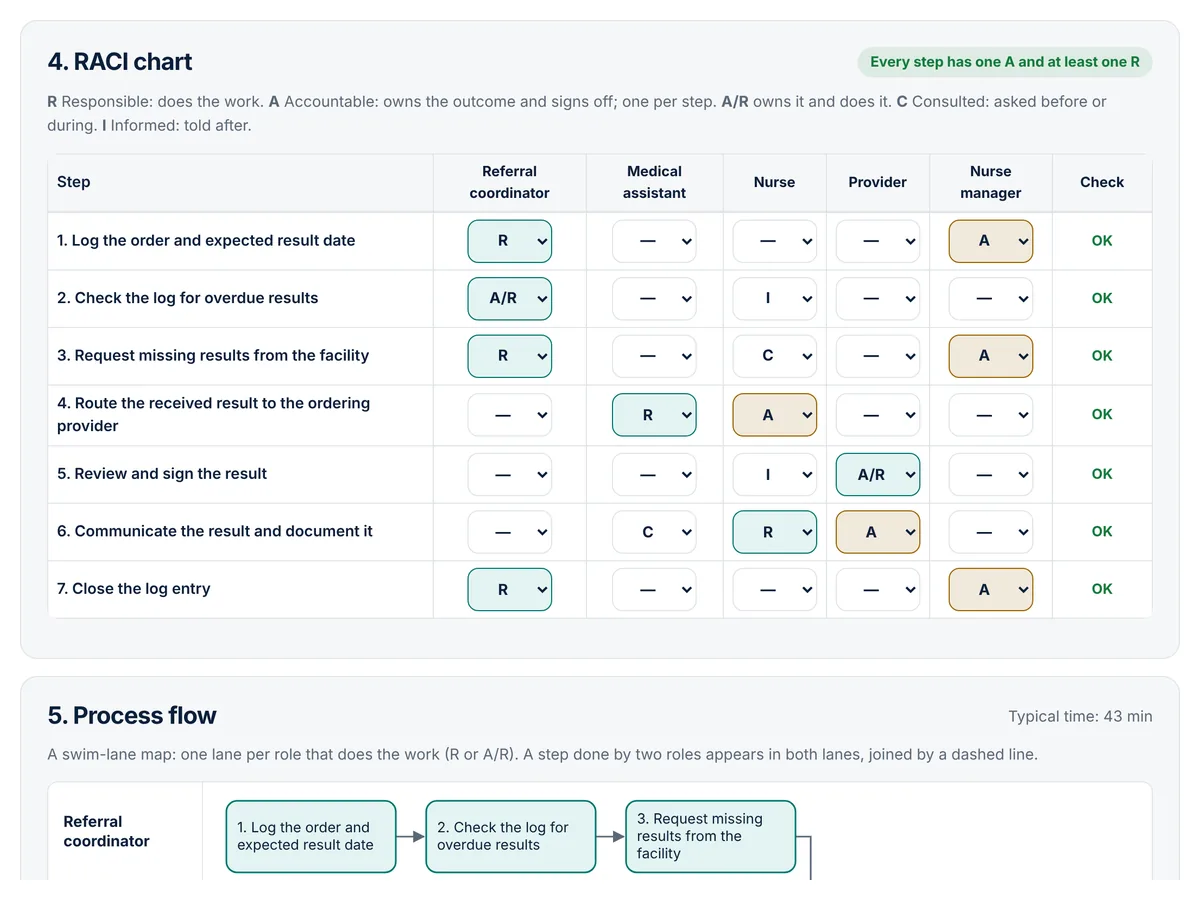
Pick R, A, A/R, C or I for each role on each step. The tool flags any step without exactly one A and at least one R.
4. Print, export, review
Get the finished SOP with a swim-lane flow and approval block. Print it, save it as PDF, or export Markdown, CSV or SVG.
A RACI chart for healthcare teams, checked as you go
The rule that matters most is simple: every step needs one role that owns the outcome and at least one role that does the work. The chart shows OK or Fix on every row and says exactly what is missing, such as "Step 4: 2 Accountable roles (keep one)". It also points out roles with no part in any step.
From the same chart the tool draws a swim-lane process map, one lane per role that does the work, with an arrow for every hand-off. AHRQ's EvidenceNOW guide to workflow mapping describes swim lane diagrams as a way to clarify each care team member's responsibilities (AHRQ: How to Map Workflows in Health Care Settings).
How to write a clinic SOP with it, step by step
- Pick one recurring process that causes rework, such as new patient registration.
- Walk it with the people who do it and write the steps the way the work is really done.
- Add the roles, not people's names, so the SOP survives staff changes.
- Fill the RACI chart until every row says OK.
- Write the exceptions and one or two metrics with a target.
- Approve it through your usual process, print it with the signature block, and set the review interval your policy requires.
Three fictional examples are built in: new patient check-in, outside test result follow-up, and new resident onboarding. Add one, then edit it to match your own policies.
Who it is for
- Practice managers building or refreshing a medical office policies and procedures manual.
- Nurse managers documenting unit workflows and hand-offs.
- Residency program coordinators writing onboarding and scheduling procedures.
- Quality teams standardizing a process after a QI project.
Pricing
The free builder is complete and live now.
Free
- Up to 100 SOPs, 60 steps and 12 roles each
- Checked RACI chart and swim-lane flow
- Review dates and an overdue list for your library
- Print or PDF with your clinic name, sign-off and staff acknowledgment
- SOP index (.csv) plus Markdown, RACI CSV, SVG and JSON backup
Pro
or $79 a year, for one person
- Word (.docx) export with your clinic name and logo
- Version history with a change note for each revision
- Review reminders you can add to your calendar
- Optional sync across your devices (off unless you turn it on)
Team
for a clinic, department or program office: up to 15 editors, and staff who only read and acknowledge are not counted; annual invoicing available
- Everything in Pro for each member
- One shared SOP library the team can edit
- Approval sign-off and a read-and-acknowledge list for staff
- Whole manual as one PDF with a table of contents
Pro and Team are in early access. Reserving a spot is free and nobody is charged until their plan is activated. The prices shown are the planned launch prices, and we will email you from [email protected] before anything is billed.
Clinic SOP FAQ
What is an SOP in a clinic?
A standard operating procedure is a written description of how a recurring piece of work is done: the steps in order, who does each one, what to do when the usual path does not work, and how you will know it is working. In a clinic that covers work such as check-in, result follow-up, referrals and onboarding.
What is a RACI chart?
A RACI chart lists the steps of a process down the side and the roles across the top. Each cell says whether that role is Responsible (does the work), Accountable (owns the outcome and signs off), Consulted (asked before or during) or Informed (told after). Many teams also use A/R when the same role owns the step and does it.
Why does each step need exactly one Accountable role?
If two roles are accountable, each can assume the other is following up; if none is, nobody is. The tool flags any step with no Accountable role, more than one, or no Responsible role.
How often should clinic SOPs be reviewed?
There is no single interval for every clinic. Your own policy, accreditor, payers and state can each set expectations, so check the ones that apply to you. The tool lets you set each SOP to a 6, 12, 24 or 36 month review and shows which SOPs are overdue or due within 30 days.
Can I enter patient information?
No. An SOP describes how work is done, not who it was done for. The tool refuses text that looks like a patient identifier, such as a record number or date of birth with its value. The check cannot catch everything, so keep patient details out and use roles instead of names.
Where is my data stored?
Only in your browser's local storage on the device you use. Nothing is sent to MedRise. Back up saves a file you can restore on another device, and Clear my data deletes everything.
Will this make our clinic compliant?
No tool can do that by itself. Clinic SOP Builder helps you write down how your team works and keep the review dates in view. What each SOP must say, and who must approve it, is set by your organization and the rules that apply to it.
Write your next SOP before the next staff meeting
Free, private and ready in your browser. Add a fictional example to see a finished SOP in one click.
Workflow support only. Clinic SOP Builder helps a team write down how it does its own work. It does not give clinical advice, does not decide what your policies must say, and does not guarantee that an SOP meets any accreditation, payer or regulatory requirement. It is not affiliated with or endorsed by AHRQ. It is not for patient information. See the terms and disclaimer and privacy notice.