Clinic No-Show and Overbooking Calculator · Free
A patient no-show calculator that tells you how many to overbook.
Enter scheduled appointments and no-shows from your scheduling report. See your no-show rate with an honest 95% interval, what missed visits cost per month and per year, and how many extra patients to book per session without overloading the day.
For practice managers, clinic administrators and scheduling leads. Counts only, no patient information, no account, nothing uploaded.
Why no-shows are harder to manage than they look
Every empty slot is a visit you prepared for and could not bill. Most practices know their no-show rate roughly; fewer know what it costs, and the next question is harder still: how many extra patients should we book to make up for it?
Overbooking by gut feel goes wrong in both directions. Book too few and providers sit idle. Book too many and a good day turns into a crowded waiting room and overtime. Researchers have studied this trade-off for years. Huang and Hanauer (Applied Clinical Informatics, 2014) write that clinic overbooking is, in general, done "blindly", without considering when a no-show is likely to occur.
Many no-show calculators stop at "you lost this much". This one also shows the odds behind each overbooking choice.
How the no-show rate calculator works
1. Enter your counts
Scheduled appointments, no-shows and late cancellations, for the whole period or one row per weekday, appointment type or clinic.
2. See rate and cost
The no-show rate with a 95% interval, lost visits after refills, revenue lost this period and per year, and what a target rate would recover.
3. Plan overbooking
Set slots per session, your overflow cost and limit. Compare every option from zero extra bookings upward and get a suggestion.
4. Report it
Copy a plain-text summary for a slide, export CSV files, print a short report, and keep a backup file to move between devices.
The method, in plain terms
- No-show rate = no-shows ÷ scheduled appointments × 100. You choose whether late cancellations count as missed appointments.
- 95% interval: a Wilson score interval around every rate. A Monday with 40 appointments and 6 no-shows reports 15%, but the interval runs from about 7% to 29%, so it may not really be worse than Tuesday.
- Cost of patient no-shows = missed visits × (1 − share of slots you refill) × your average collected revenue per visit, then × periods per year.
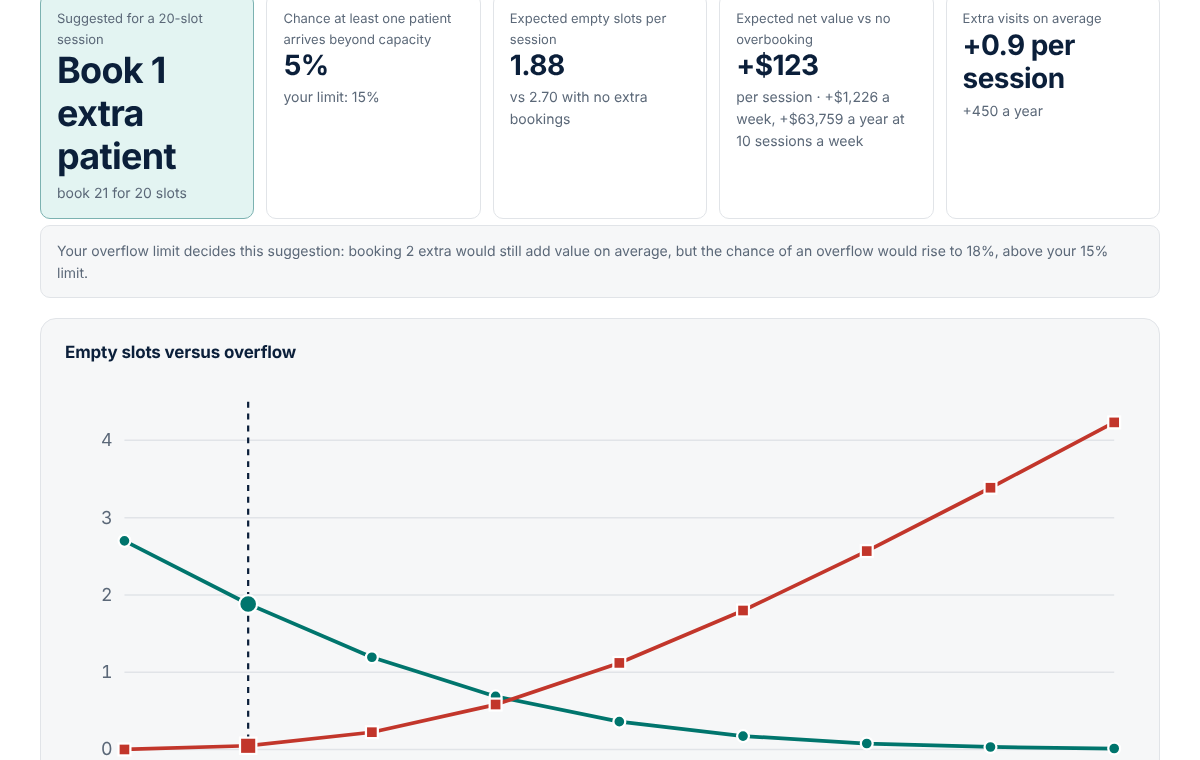
- Overbooking: if you book a session with more patients than slots, the number who arrive follows a binomial distribution. The planner computes expected empty slots, expected patients beyond capacity, the chance of any overflow, and the expected net value of each option compared with no overbooking.
- Your limits, not ours: you set the cost of an extra patient and the highest chance of an overflow you accept. The suggestion is the best expected value within that limit.
Who it is for
- Practice managers and office managers who need a no-show number and a cost for the partners meeting.
- Clinic operations and access teams deciding whether to add overbook slots, and how many, by day or session type.
- Front-desk and scheduling leads who want a rule they can explain instead of guesswork.
How to calculate your no-show rate and overbooking plan
- Run an appointment status report from your practice management system for one month: scheduled, no-show and late-cancelled counts. Totals only.
- Open the tool and add one row per weekday (or per appointment type). Tick whether late cancellations count as missed.
- Enter your average collected revenue per visit and the share of missed slots you usually refill from a waitlist.
- Read the rate, its interval and the annual cost. Add a target rate to see what reaching it would recover.
- Open the overbooking planner, enter the slots in a typical session, what an extra patient beyond capacity costs you, and your overflow limit.
- Start with the suggested number or fewer, track the next few weeks, and update the counts.
Pricing
The free calculator is complete and live now.
Free
- No-show and late-cancellation rates with 95% intervals by row
- Lost visits and revenue per period and per year, target-rate what-if
- Overbooking planner with odds, expected value and charts
- Copy-ready summary, CSV export, printable report, backup and import
Pro
or $79 per year
- Month-by-month history with a trend chart of your no-show rate
- Import an appointment status report (CSV) and count it automatically by day and type
- Saved overbooking plans for each session type
- One-page PDF report for partners or the board
Team
for a group practice: up to 5 users and 3 locations
- Everything in Pro for up to 5 users and 3 locations
- Location comparison on one dashboard
- Shared overbooking rules your schedulers can see
Pro and Team are in early access. Reserving a spot is free and nobody is charged until their plan is activated; we will email you from [email protected] with the final price before anything is billed.
FAQ
How do you calculate a no-show rate?
No-show rate = no-shows ÷ scheduled appointments × 100, for the same period. For example, 24 no-shows out of 200 scheduled appointments is a 12% no-show rate. Decide whether late cancellations count as missed appointments; the calculator lets you include or exclude them and always shows the no-show-only rate as well.
What is a typical patient no-show rate?
It depends on the clinic, location and specialty. A 2014 review in Applied Clinical Informatics (Huang and Hanauer) reports that prior studies found no-show rates generally ranging from 10% to 30%. The most useful comparison is your own clinic over time, by day and by appointment type.
How many patients should a clinic overbook?
It depends on your no-show rate, how many slots a session has, and how much an extra patient beyond capacity costs you. The planner compares every option from zero extra bookings upward, shows the chance that at least one patient arrives beyond capacity, and suggests the option with the best expected value within the overflow limit you set.
Does overbooking work?
Research suggests it can. LaGanga and Lawrence (Decision Sciences, 2007) found that overbooking can increase patient access and provider productivity, at the cost of longer waits and staff overtime, and that clinics with larger patient volumes, higher no-show rates and similar appointment lengths benefit most.
Do I need to enter patient information?
No. The calculator works only with totals from your scheduling report, such as 200 scheduled and 24 no-shows on Mondays. It rejects row labels that look like record numbers, dates of birth or names written as Last, First, but it cannot catch everything, so never enter patient names or details.
Where is my data stored?
Only in your browser's local storage on the device you use. Nothing is sent to MedRise. You can download a backup file, import it on another device, export CSV files, and delete everything with Clear my data.
Sources: Huang Y, Hanauer DA. Patient no-show predictive model development using multiple data sources for an effective overbooking approach. Applied Clinical Informatics 2014;5(3):836–860; LaGanga LR, Lawrence SR. Clinic overbooking to improve patient access and increase provider productivity. Decision Sciences 2007;38(2):251–276 (plain-language summary, University of Colorado Boulder).
Put a number on your no-shows today
Free, private and ready in your browser. Load the fictional example first to see the full report in one click.
Education and workflow support only. The Clinic No-Show and Overbooking Calculator estimates scheduling and revenue effects from your own aggregate appointment counts. It does not predict which patient will miss an appointment, does not give medical, financial or legal advice, and must not be used to deny or ration care. Never enter patient information. See the terms and disclaimer and privacy notice.