Nurse Staffing FTE Calculator · Free
A nursing FTE calculator that turns your staffing grid into a budget.
Enter your shifts and how many of each role are on duty. See hours per patient day, worked and paid FTEs, the gap against the staff you have, headcount and labor cost. Then download an Excel workbook whose formulas still work. No account, no upload.
For nurse managers, directors, charge nurses stepping into leadership and nursing budget analysts. Census numbers and headcounts only, never patients.
Why staffing math goes wrong in a spreadsheet
Every budget season a nurse manager turns a staffing grid into full-time equivalents: five RNs on days, four on nights, two aides, a unit secretary on weekdays. The arithmetic is simple but long. Hours become annual hours, annual hours become worked FTEs, worked FTEs need extra for vacation, holidays, sick time and education, and finance wants the cost.
Most units do this in a spreadsheet someone built years ago. Change the non-productive percentage, add a 4-hour mid shift or move to 12-hour shifts, and a formula breaks or a row drops out of the total. Nurse Staffing FTE Calculator does the whole chain in one place, shows every step, and gives you a clean workbook to hand to finance.
How the nursing FTE calculator works
1. Describe the unit
Average daily census, non-productive percentage, paid hours per FTE and, if you have one, your target hours per patient day.
2. Build the staffing grid
Your shifts and their lengths, then the headcount on duty for each role on a weekday and a weekend day.
3. Read the results
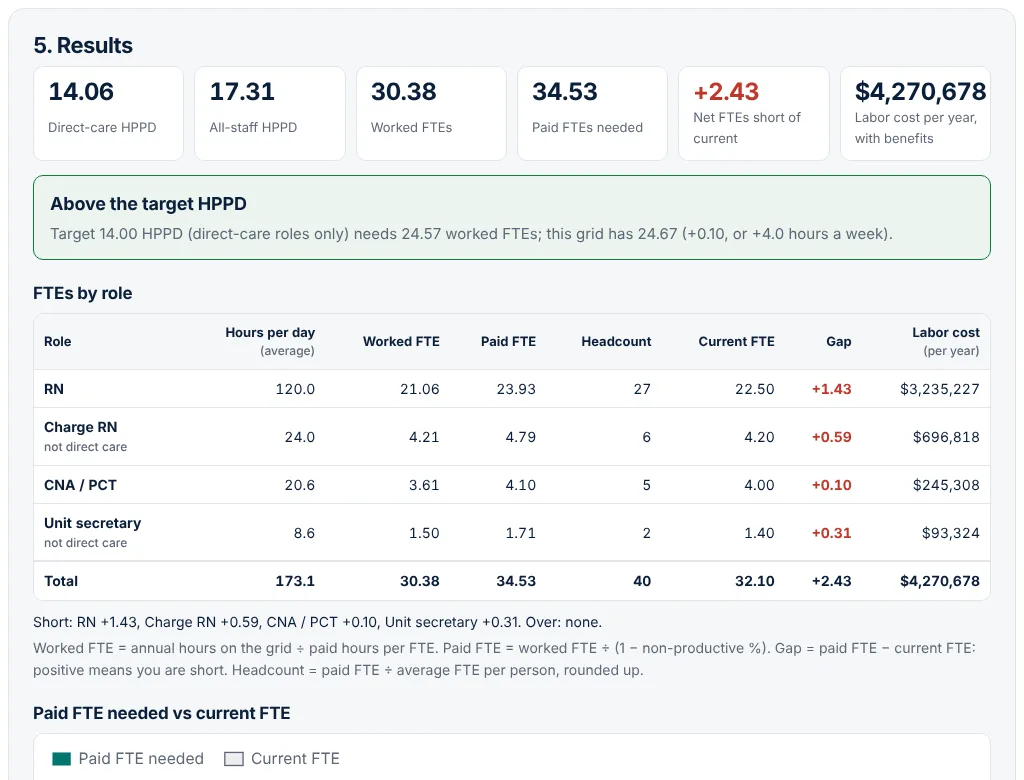
HPPD, worked and paid FTEs by role, headcount, the gap against current FTEs, labor cost and patients per staff member on each shift.
4. Download Excel
A four-sheet workbook with your inputs in blue and every result as a live formula, ready for your budget file.
The staffing formulas it uses
The tool uses commonly used nursing staffing math, as set out for example in an independent CNML exam prep guide and a healthcare finance textbook (OpenExamPrep CNML staffing math guide, not affiliated with AONL; Healthcare Finance, chapter 15, Illinois Open Publishing Network):
- Hours per patient day (HPPD) = direct-care hours worked in 24 hours ÷ average daily census.
- 1.0 FTE = 40 hours × 52 weeks = 2,080 paid hours a year. You can change the base.
- Worked FTE = annual hours on the grid ÷ paid hours per FTE.
- Paid FTE = worked FTE ÷ (1 − non-productive %). The multiplier 1 ÷ (1 − non-productive %) is often called the relief factor.
- Weekday and weekend staffing are averaged as 5 and 2 days in 7.
Which hours count as non-productive, and which roles count as direct care, varies between organizations. The tool lets you set both, so use your own budget definitions.
How to calculate nursing FTEs from a staffing grid
- Enter the average daily census you are budgeting for: total patient days ÷ days in the period.
- Set non-productive time. If you do not know the percentage, add up vacation, holiday, sick and education hours per FTE and the tool works it out.
- List your shifts, such as Day 12 hours and Night 12 hours, or 8-hour days, evenings and nights.
- Fill in the grid: how many RNs, LPNs, aides and support staff are on duty each shift, weekday and weekend. Tick Direct care for roles that count toward HPPD.
- Add current FTEs and hourly rates to see the gap and the labor cost, then download the workbook.
Want to compare 8-hour and 12-hour shifts, or a different skill mix? Duplicate the plan, change it, and switch between the two. Two fictional examples are built in.
Who it is for
- Nurse managers and directors building the annual staffing budget or making the case for a new position.
- Charge nurses and assistant managers learning the budget side of the job.
- Nursing finance and budget analysts checking a unit's grid against its FTEs.
- Nurse leadership students and certification candidates practising HPPD and FTE calculations on realistic numbers.
Pricing
The free calculator is complete and live now.
Free
- Up to 30 plans, 20 roles and 6 shifts each
- HPPD, worked and paid FTEs, gap, headcount and labor cost
- Target HPPD check and patients per staff member
- Excel workbook with live formulas, CSV and JSON backup
Pro
or $59 a year, for one manager or analyst
- Department roll-up: several units in one workbook
- Compare up to four plans in one Excel workbook
- Budget vs actual: import worked hours by pay period from CSV
- Your unit and organization name on every export
Team
for a nursing department: up to 15 editors; annual invoicing available
- Everything in Pro for each editor
- Shared plans that managers and finance edit together
- Department totals across every unit
- Saved department defaults for hours per FTE and non-productive time
Pro and Team are in early access. Reserving a spot is free and nobody is charged until their plan is activated. The prices shown are the planned launch prices, and we will email you from [email protected] before anything is billed.
Nursing FTE calculator FAQ
How do you calculate nursing FTEs?
Add up the hours your staffing grid needs in a year, then divide by the paid hours in one full-time equivalent, usually 2,080 (40 hours a week for 52 weeks). That gives worked FTEs. Because staff also take paid vacation, holidays, sick time and education, divide worked FTEs by (1 − the non-productive percentage) to get the paid FTEs you need to budget.
What is HPPD in nursing?
Hours per patient day is the number of direct-care nursing hours worked in 24 hours divided by the average daily census. It describes workload. It is not on its own a safe staffing standard, and units and organizations define direct care differently.
What is the difference between worked and paid FTEs?
Worked, or productive, FTEs cover the hours staff are actually on the unit. Paid FTEs also include non-productive hours that are paid but not worked, such as vacation and education. Paid FTEs are larger whenever non-productive time is above zero, and they are what the salary budget is built on.
What non-productive percentage should I use?
Use your own organization's figure from its budget or payroll reports, since paid leave policies and the hours counted as non-productive differ. If you do not have one, enter the vacation, holiday, sick and education hours for one full-time employee and the tool converts them to a percentage.
Does the Excel workbook keep the formulas?
Yes. The workbook has Summary, Inputs, Staffing grid and Notes sheets. Inputs are blue on a light yellow background and every result is a formula, so changing a census, a headcount or the non-productive percentage in Excel recalculates the totals. It opens in Excel, Numbers, LibreOffice and Google Sheets.
Does it check nurse-to-patient ratio laws?
No. The tool shows the average daily census divided by the headcount on each shift as a planning view, but it does not know which state laws, accreditation standards or union contracts apply to your unit. Check those separately.
Where is my data stored?
Only in your browser's local storage on the device you use. Nothing is sent to MedRise, and the Excel file is made in your browser. Back up saves a file you can restore elsewhere, and Clear my data deletes everything. The tool never needs patient information.
Build next year's staffing budget in minutes
Free, private and ready in your browser. Load the fictional med-surg or ICU example to see every result in one click.
Education and workflow support only. Nurse Staffing FTE Calculator does arithmetic on the numbers you enter. It does not decide how many staff a unit needs for safe care, does not check any law, ratio rule or union contract, and does not replace your organization's budget process or professional judgment. It is not for patient information. See the terms and disclaimer and privacy notice.