Hazard Vulnerability Analysis Tool · Free
A hazard vulnerability analysis your whole team can finish in one meeting.
Score each hazard for probability, impact and readiness. The tool ranks your relative risks, maps them on a risk matrix, flags high risks with no plan, and prints the report for your emergency management binder.
For emergency preparedness leads, practice and facility managers in clinics, surgery centers, home health, hospice, dialysis, long-term care and small hospitals. No account, nothing uploaded.
Why the all-hazards risk assessment keeps slipping
Every provider covered by the CMS emergency preparedness rule (17 provider and supplier types) needs an emergency plan built on a documented, facility-based and community-based risk assessment using an all-hazards approach. For hospitals that is 42 CFR 482.15(a)(1); for ambulatory surgical centers, 42 CFR 416.54(a)(1); and accredited hospitals answer to a matching Joint Commission all-hazards vulnerability analysis standard (EM.11.01.01).
In practice the HVA is often an old spreadsheet with locked macros, inherited from someone who left. Free spreadsheets are widely shared, and some templates are member benefits: the ASHE HVA tool, for example, is an Excel workbook offered as a member benefit. Enterprise emergency management platforms include HVA modules, but they are built and priced for health systems. A small surgery center or home health agency often ends up copying last cycle's numbers forward.
The Hazard Vulnerability Analysis Tool is a free HVA template for healthcare that runs in your browser: a starter list of 36 common hazards, the familiar 0 to 3 scoring method, live results, and a mitigation register so the assessment turns into work someone owns.
How the HVA tool works
1. Set up
Pick your facility type and assessment date; the tool shows when the next review is due. Untick hazards that cannot affect you and add local ones, like a dam upstream or a rail line nearby.
2. Score
Seven 0–3 scores per hazard: probability, human, property and business impact, and preparedness, internal and external response. Mark a hazard not applicable in one tap. Notes record why.
3. See your risks
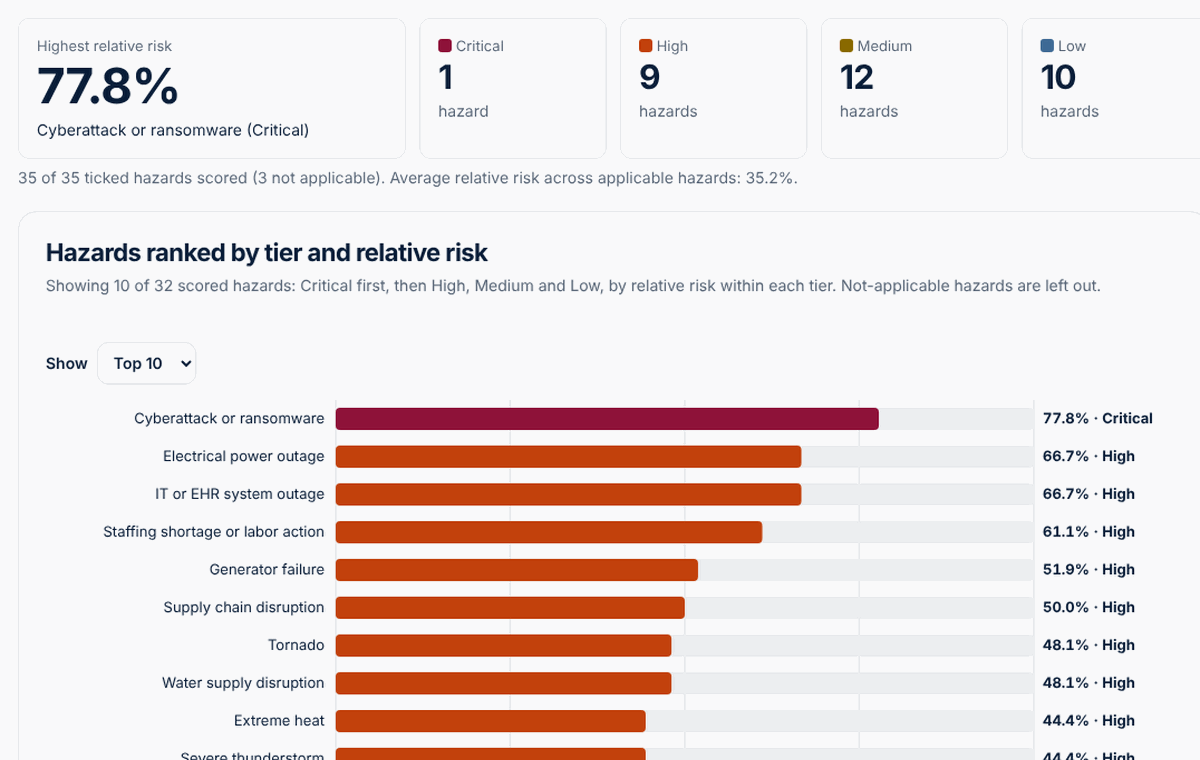
Hazards ranked by tier and relative risk, a probability-by-severity matrix with Critical, High, Medium and Low tiers, and averages by category.
4. Act and report
Add owned, dated actions for the top risks; the tool lists high and critical hazards with no plan yet. Print or save a PDF report and export CSV for your committee.
The scoring method, in plain terms
- Probability: 0 not applicable, 1 low, 2 moderate, 3 high.
- Impact: human (injury or death), property (damage and replacement) and business (services interrupted, staff unable to work, supplies, reputation), each 0 none to 3 high.
- Mitigation: preparedness, internal response and external response, scored in reverse (1 strong, 3 weak or none) so weaker readiness raises risk.
- Relative risk = (probability ÷ 3) × (sum of the six impact and mitigation scores ÷ 18) × 100%. This is the same probability × severity calculation (severity = the six magnitude and mitigation scores added together ÷ 18) as the sample HVA spreadsheet that many healthcare emergency programs started from.
- Tiers: a 3 × 3 risk assessment matrix of probability against severity. High probability and high severity is Critical; low probability and low severity is Low.
Who it is for
- Emergency preparedness coordinators who need a clean, current all-hazards risk assessment before a survey or the next plan update.
- Practice managers and administrators of surgery centers, dialysis units, FQHCs, rural health clinics and physician practices who wear the emergency management hat part-time.
- Home health, hospice and long-term care leaders whose CMS emergency preparedness review comes around every 2 years, or every year in long-term care.
- Healthcare administration, nursing and public health students learning risk assessment with the fictional example.
How to run your HVA meeting with this tool
- Invite a small mixed group: leadership, clinical, facilities, IT and, if you can, your local emergency management or healthcare coalition contact.
- Before the meeting, open the tool, set your facility type and date, and untick hazards that clearly do not apply.
- Share your screen and score each hazard together. Agree the probability first, then impact, then readiness. Write the reasoning in the notes.
- Open Results. Discuss the top five and anything Critical or High.
- On the Action plan tab, give each high or critical hazard at least one action with an owner and a due date; use them to choose your next exercise.
- Print or save the PDF, export the CSV and download a backup JSON for next cycle.
Pricing
The free tool is complete and live now.
Free
- 36-hazard starter list plus your own hazards
- 0–3 scoring with live relative risk and tiers
- Ranked chart, risk matrix and category summary
- Action plan with owners, due dates and gaps
- Community-based assessment notes, ruled-out hazards with reasons, and a sign-off line
- Printable report, CSV export and JSON backup
Pro
or $79 per year
- Account with assessments synced across your devices
- Keep every cycle and compare this year's scores with last year's
- A fully scored community-based assessment with its own matrix
- Exercise planner that picks scenarios from your top risks
Team
for up to 10 people or several sites; annual invoicing available
- Everything in Pro for up to 10 people
- Each committee member scores on their own, then see the averaged scores
- Multi-site roll-up of top risks across locations
- Action plan reminders by email
Pro and Team are in early access. Reserving a spot is free and nobody is charged until their plan is activated; we will email you from [email protected] with the final price before anything is billed.
FAQ
What is a hazard vulnerability analysis (HVA)?
A hazard vulnerability analysis is a structured, all-hazards risk assessment. A team lists the natural, technological, human-caused and hazardous materials events that could affect a facility, scores how likely each one is, how much harm it would do and how prepared the facility is, and ranks the results so the emergency plan, training and exercises focus on the biggest risks first.
Is a hazard vulnerability analysis required?
For the 17 provider and supplier types covered by the CMS emergency preparedness rule, yes: the emergency plan must be based on a documented, facility-based and community-based risk assessment using an all-hazards approach (for hospitals, 42 CFR 482.15(a)(1)). The ambulatory surgical center rule (42 CFR 416.54) has the same wording, and Joint Commission-accredited hospitals also have an all-hazards vulnerability analysis standard (EM.11.01.01). Physician practices are not one of the 17 CMS types, but accreditors, states and insurers may still expect one.
How often should we update our HVA?
The CMS rule requires the emergency program, including the risk assessment, to be reviewed and updated at least every 2 years, and at least every year for long-term care facilities. Your accreditor or state may ask for more frequent review. Update it sooner after a real event, an exercise or a major change to your building, services or community. The tool shows your next review date from the assessment date and facility type.
How does the tool calculate relative risk?
Each hazard gets seven scores from 0 to 3: probability; human, property and business impact; and preparedness, internal response and external response, where weaker readiness scores higher. Relative risk equals probability divided by 3, times the sum of the six impact and readiness scores divided by 18, times 100 percent. A probability of 0 marks the hazard as not applicable.
What do Critical, High, Medium and Low mean?
The tool places every scored hazard on a 3 by 3 matrix of probability (low, medium, high) against severity, which is impact after readiness. High probability with high severity is Critical; high with medium, or medium with high, is High; and so on down to Low. Results list Critical hazards first, then High, Medium and Low, ordered by relative risk within each tier.
Where is my data stored, and can I enter patient information?
Your assessment is saved only in this browser's local storage; nothing is sent to MedRise. Download a JSON backup to move it to another device or keep it with your emergency plan, and use Clear my data to delete it. Never enter patient names, record numbers, room numbers or any detail about an individual patient: the tool is for facility-level planning only.
Sources: CMS, Understanding the Emergency Preparedness Final Rule update (2019); 42 CFR 482.15, hospital emergency preparedness (current text); 42 CFR 416.54, ASC emergency preparedness; Summary of Joint Commission emergency management standards (AFT, 2025); Sample hazard vulnerability analysis tool (HASC archive); ASHE Hazard Vulnerability Assessment tool page. Requirements change: confirm against the current regulation and your accreditor's manual.
Start your next HVA here
Free, private and ready in your browser. Load the fictional example first to see full results in one click.
Education and workflow support only. The Hazard Vulnerability Analysis Tool helps a team document and prioritize a facility-level all-hazards risk assessment. It does not determine compliance with CMS, accreditation or state requirements, does not diagnose or treat anyone, and does not replace your emergency management program or local emergency management guidance. Never enter patient information. See the terms and disclaimer and privacy notice.